
Case Notes
Hidden Metadata in Photos and Documents: What I Learned Building No Trace Share

A photograph can contain more than the scene it shows. A document can reveal information beyond the words on its pages. Depending on the file format and the software used to create it, a file may carry GPS coordinates, timestamps, device details, author names, editing information, or records of an AI-assisted workflow.
This information is called metadata. Much of it is useful. Some of it is necessary. But certain metadata can also reveal details that the person sharing the file never intended to disclose.
As a web developer, I became interested in a practical problem: why is it so easy to share a file without understanding what else might travel with it? That question eventually led me to build No Trace Share, a browser-based tool for inspecting, selectively cleaning, and verifying supported metadata in photos and documents.
This article explains the problem behind the tool, the distinctions that matter when removing metadata, and the development decisions I believe are important when building software that people trust with personal files.
What is hidden file metadata?
Metadata is information stored in or associated with a file that describes its characteristics, origin, creation, modification, or handling. Some metadata is shown by ordinary file viewers. Other fields require a specialized inspector to examine.
Consider a photograph taken with a smartphone. The visible image may show a room, an object, or a completed project. Depending on the phone’s settings and how the file was saved, its embedded metadata may also include when the photograph was taken, which device captured it, and where it was recorded.
A Word document may contain author or last-modified-by properties. A PDF may carry a title, creator application, or other document metadata. An image produced or edited through an AI workflow may contain generation-related records.
None of this means every file contains all these fields, or that every sharing service exposes them to the final recipient. Applications may preserve, modify, or remove metadata during export or upload. The important point is that the visible file alone does not tell you what metadata is present.
What can different metadata fields reveal?
| Metadata category | Possible information | Why someone might care |
|---|---|---|
| GPS and location | Latitude, longitude, altitude, or location-related timestamps | A photograph may disclose a home, workplace, or another location. |
| Capture dates and times | When an image was recorded or a file was modified | The timing may reveal details about activities or work that were not intended for the recipient. |
| Device and software | Camera model, editing software, or application information | These fields can reveal aspects of the equipment or workflow used to create the file. |
| Document properties | Author, last editor, organization, title, or application properties | A shared business document may carry names or internal information beyond its visible content. |
| AI-related records | Generation parameters, prompts, software markers, or supported workflow information | These records may reveal aspects of how an image or document was generated or edited. |
| Provenance and color information | Content Credentials, authorship-related records, or ICC color-profile information | Some records support attribution, provenance, or accurate appearance and should not be removed indiscriminately. |
Not every metadata field is sensitive. Some information helps applications render files correctly, helps creators maintain attribution, or allows recipients to understand a file’s history. A responsible privacy workflow distinguishes between information that creates an unwanted disclosure and information that has a legitimate purpose.
Three situations where hidden metadata matters
1. Sharing photographs from a private location
Imagine a local contractor sharing a photograph of completed work inside a customer’s home. The contractor may want the recipient to see the quality of the work without exposing location information that happens to be stored in the original image.
If the photograph contains GPS coordinates, those coordinates may disclose the capture location. Removing the supported location metadata can reduce that particular risk.
But the photograph itself may still show a street sign, house number, recognizable building, reflection, or another location clue. Metadata removal does not erase information visible in the image.
That distinction is important: cleaning hidden metadata is one part of reviewing a file before sharing, not a substitute for examining its visible content.
2. Sending client documents outside an organization
Consider a consultant preparing a proposal or an agency sending a presentation. The visible document may be intended for the recipient, while certain author properties or internal application details may not be relevant to the exchange.
Office documents can also contain more than ordinary document properties. Comments, tracked changes, hidden sheets, speaker notes, and other structures may carry information that requires separate review.
Microsoft provides a Document Inspector for checking hidden data and personal information in supported Office files. Importantly, Microsoft recommends inspecting a copy because removing some information may not be reversible.
Microsoft’s official guide to inspecting hidden document information explains these risks and the available inspection controls.
The lesson is not that every document requires aggressive cleaning. It is that the information inside a file should be reviewed according to its format and the circumstances in which it will be shared.
3. Sharing AI-assisted images and creative work
Some image-generation and editing workflows save additional information alongside the final image. Depending on the application and format, this may include prompts, generation parameters, software identifiers, workflow data, or provenance records.
These records are not all equivalent. A software field identifying an AI-generation tool is different from a generic editing history. Content Credentials can describe the origin and editing history of many kinds of media; their presence alone does not establish that an image was generated by AI.
Likewise, removing an AI-related metadata record does not change the origin of the image, establish authenticity, or remove an invisible pixel-level watermark. It only changes the supported file metadata that was actually handled.
For creators and businesses, the correct decision may be to preserve provenance information rather than remove it. Contractual, platform, disclosure, or other obligations may also apply. Metadata controls should not be used to misrepresent how content was created.
Why removing every metadata field is not always the right solution
The phrase “remove all metadata” sounds reassuring, but it oversimplifies how different file formats work.
Metadata is not a single detachable block shared by every image and document. JPEG, PNG, WebP, HEIF, PDF, and Office formats have different internal structures, and those structures serve different purposes.
For example, an image may contain an ICC color profile that helps color-managed software display its colors as intended. Removing that profile without considering its function can change the image’s appearance. Some orientation information is also important for displaying an image correctly.
Authors and organizations may have legitimate reasons to retain copyright or provenance information. A professional may need to preserve a document’s history for recordkeeping, review, or compliance. Removing data without understanding its purpose can create a different problem from the one the user was trying to solve.
I believe a better question is:
Which information should be removed, which information should remain, and how can we verify what actually changed?
That question led to the approach behind the tool I built.
Why I built No Trace Share
I wanted to create something more understandable than a blind metadata-removal button.
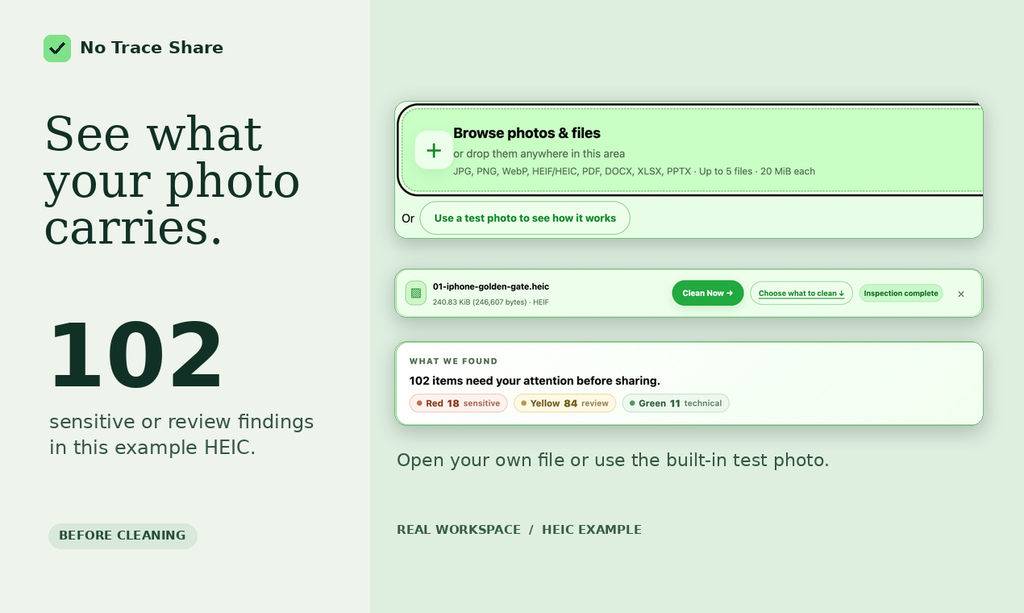
The idea was to make the hidden layer of a file visible, give the person sharing it meaningful control over supported properties, and inspect the resulting copy rather than simply claiming the operation succeeded.
That became No Trace Share, a browser-based tool for inspecting and cleaning supported metadata in images and documents.
The current web tool supports JPEG/JPG, PNG, WebP, compatible HEIF/HEIC still images, PDF, DOCX, XLSX, and PPTX. It accepts up to five files at a time, with a 20 MiB limit per file.
It is designed around five steps: inspect, understand, clean, verify, and save or share.
Inspect before changing anything
The tool examines supported metadata structures and presents findings that a user can review. The purpose is to show what is actually present rather than imply that every photograph or document contains the same hidden information.
Choose what should change
Automatic cleaning provides a recommended path for supported information. Users can also review supported properties and make more deliberate choices about what to keep, remove, or replace where those controls are available.
Process the file locally
Supported inspection and cleaning run in the browser. The selected file contents are not uploaded to No Trace Share for processing. The website delivers the application code, while supported file operations take place on the user’s device.
This should not be confused with a claim that the website makes no network requests whatsoever. Like other websites, it must load its pages and resources. It also uses limited first-party usage analytics, which are separate from the selected files and their metadata values.
Create a separate cleaned copy
The original selected file is not overwritten. A supported cleaning operation creates a new output based on the original and the user’s current choices.
Preserving the original matters because users may later need metadata for attribution, color handling, editing, recordkeeping, or another legitimate purpose.
Inspect the new copy again
After cleaning, the application reinspects the generated copy and reports the supported findings that remain. When a file contains a structure that cannot be handled safely, the tool can preserve it, disclose the limitation, or refuse the operation rather than silently treating it as successful.
This last step is particularly important to me. An interface saying “Done” is not the same as evidence that the supported operation produced the intended result.
What the tool can clean—and where its limits begin
Different file formats require different boundaries. These are the important distinctions in the current web application.
| File format | Supported cleaning scope | Important limitation |
|---|---|---|
| JPEG/JPG | Supported EXIF, GPS, XMP, IPTC, AI-related records, and compatible color-profile metadata | Visible image information remains; color handling requires care. |
| PNG and WebP | Supported text, image metadata, provenance, and related metadata structures | Pixel-level watermarks and visible content are not removed. |
| HEIF/HEIC | Compatible still-image metadata and supported color-profile structures | Some thumbnails, auxiliary images, profiles, or unsupported structures may remain. |
| Supported document metadata only | Visible text, embedded image data, links, and other document content are not redacted. Complex structures may block cleaning. | |
| DOCX, XLSX, PPTX | Supported Office document properties | Comments, revisions, hidden sheets, speaker notes, and other embedded information may remain. |
These limits are deliberate. A metadata cleaner should not be mistaken for a complete document sanitizer, forensic privacy tool, image editor, or redaction application.
For example, Adobe provides separate PDF sanitization and redaction capabilities because hidden document information and visible sensitive content require different operations. Its official PDF sanitization guidance explains these broader document-safety considerations.
A practical five-question check before sharing a file
Whether you use No Trace Share, software already installed on your computer, or another suitable tool, I recommend thinking through five questions before sending a file outside its original context.
- What does the recipient actually need? Identify the visible content and information required for the exchange. Avoid sending additional materials without a reason.
- What hidden information may be present? Inspect supported location fields, dates, device details, authorship properties, software records, and other metadata relevant to the file.
- What needs to remain? Consider attribution, provenance, color profiles, orientation, document history, and any business or legal requirements before removing information.
- What method is appropriate? Choose a tool with capabilities suitable for the actual file format. Understand whether the processing happens locally or requires an upload, and what the tool does not support.
- What does the final copy contain? Inspect the output after cleaning. Confirm that the intended information was handled, that necessary information remains, and that the file still works for its intended purpose.
Notice that the final question is not simply “Did the app say it was successful?” It asks whether the resulting file is suitable to share.
What “verified” should and should not mean
Verification can be a useful word, but it must be defined carefully.
In No Trace Share, verification means the generated copy has been inspected again using the tool’s supported checks. Remaining supported findings can be reported before the user saves or shares the output.
It does not mean the file is anonymous, untraceable, authentic, free of all hidden information, or safe to distribute in every situation.
An image may still reveal a location through visible details. A PDF may still contain personal information in its pages. An Office document may still contain comments or hidden content outside properties cleaning. Unsupported structures may remain, even when supported metadata checks find nothing further.
Making those boundaries explicit is part of responsible product design. A limited, accurately described result is more useful than an absolute claim that cannot be substantiated.
The development lessons behind a privacy-focused tool
Building a file-processing tool reinforced several principles that I consider important in web development more broadly.
Privacy needs to be part of the architecture
Privacy is not only a promise written on a landing page. It depends on how the application handles information.
For No Trace Share, browser-local inspection and cleaning are core design choices. The product does not need selected files to be uploaded for supported processing. That reduces the need to entrust file contents to a remote processing service for this task.
Other software may have legitimate reasons to use server-side processing, but the distinction should be communicated clearly enough for users to make an informed decision.
User control is more useful when the consequences are understandable
A long list of unfamiliar technical fields does not automatically create a good user experience. People need to understand which information may matter, why it was found, and what happens if it is changed.
That is why I wanted the workflow to support both straightforward automatic cleaning and more deliberate review of supported properties.
Convenience and control should not have to be opposites.
Safe failure is part of reliability
Not every file can be safely rewritten under a limited set of rules. Some formats contain complex relationships, profiles, attachments, signatures, or other structures that require additional handling.
Refusing an unsupported operation or clearly reporting a retained structure may feel less impressive than claiming every file can be cleaned. But it is a more responsible choice than silently damaging a document or misrepresenting the result.
A trustworthy interface explains its limits
Good product design is not merely about making a process look effortless. It is also about helping people understand what the software actually did.
That principle applies beyond metadata tools. It matters in website forms, checkout flows, online account systems, data imports, document uploads, and almost any application where a user takes action based on the interface’s feedback.
An attractive confirmation message is useful only when it accurately describes the completed operation.
Who should pay attention to file metadata?
Not every file requires a detailed privacy investigation. The level of review should reflect what is being shared, with whom, and what might be disclosed unnecessarily.
| Situation | What to review | Why it matters |
|---|---|---|
| Sharing personal photographs | GPS, capture date, visible surroundings | Reduce unintended disclosure of private places or activities. |
| Sending a client proposal | Author properties, internal information, comments, revisions | Make sure only intended business information is shared. |
| Publishing project photographs | Location, device details, visible client information, attribution | Protect client privacy while preserving legitimate proof and ownership context. |
| Sharing AI-assisted creative work | Prompts, workflow fields, provenance, disclosure obligations | Understand what the file records and what should remain for transparency or attribution. |
| Distributing a PDF or presentation | Document properties, visible sensitive content, notes, attachments, hidden structures | Distinguish metadata cleaning from full document inspection and redaction. |
Frequently asked questions
Does every smartphone photograph contain GPS coordinates?
No. Location information depends on device settings, permissions, camera behavior, editing, export settings, and whether the file or sharing method preserves those fields. Inspecting the actual file is more reliable than assuming GPS is always present or always absent.
Does removing metadata make a photograph completely private?
No. Removing supported metadata can reduce particular disclosures, but the image may still contain recognizable people, locations, text, reflections, identifying objects, or other visible information. Other embedded structures may also remain.
Can a Word document contain information that is not visible on the page?
Yes. Depending on the document, this may include properties, comments, tracked changes, hidden text, or other structures. A properties-only cleaner is not equivalent to a full inspection of all hidden document content.
Does removing AI metadata prove that an image was not made with AI?
No. Metadata is not a definitive test of origin. Removing a supported AI-related record does not change how the media was created, establish authenticity, or satisfy disclosure obligations. Content Credentials may also describe non-AI creation and editing history.
Is local browser processing the same as an entirely offline application?
No. A browser-based website normally needs a network connection to load its application resources, and it may use ordinary website analytics. Local processing means the selected file can be handled on the device without uploading its contents for the supported operation. These are different claims and should not be confused.
Why inspect the cleaned copy again?
Because completing a cleaning operation does not, by itself, establish what remains. Reinspection can confirm whether supported fields were removed or retained as intended and can reveal remaining supported findings. It does not guarantee that every possible hidden structure has been detected.
The principle I want people to remember
Most people share files because they want someone to see a photograph, read a document, review a proposal, or receive completed work. They are not usually thinking about the additional information that a file may carry.
That is precisely why metadata deserves attention. The person sharing a file should have a practical opportunity to understand what is present, choose what is appropriate to share, and confirm the result.
No Trace Share is my attempt to make that process easier for supported images and documents, without requiring an account or uploading the selected file contents for processing. It does not replace careful review, full document sanitization, or a user’s responsibility to protect sensitive and legally significant information.
The broader lesson from building it is one I believe applies to trustworthy software generally: show people what matters, explain what can change, preserve what should not be damaged, and verify the result instead of asking for blind trust.
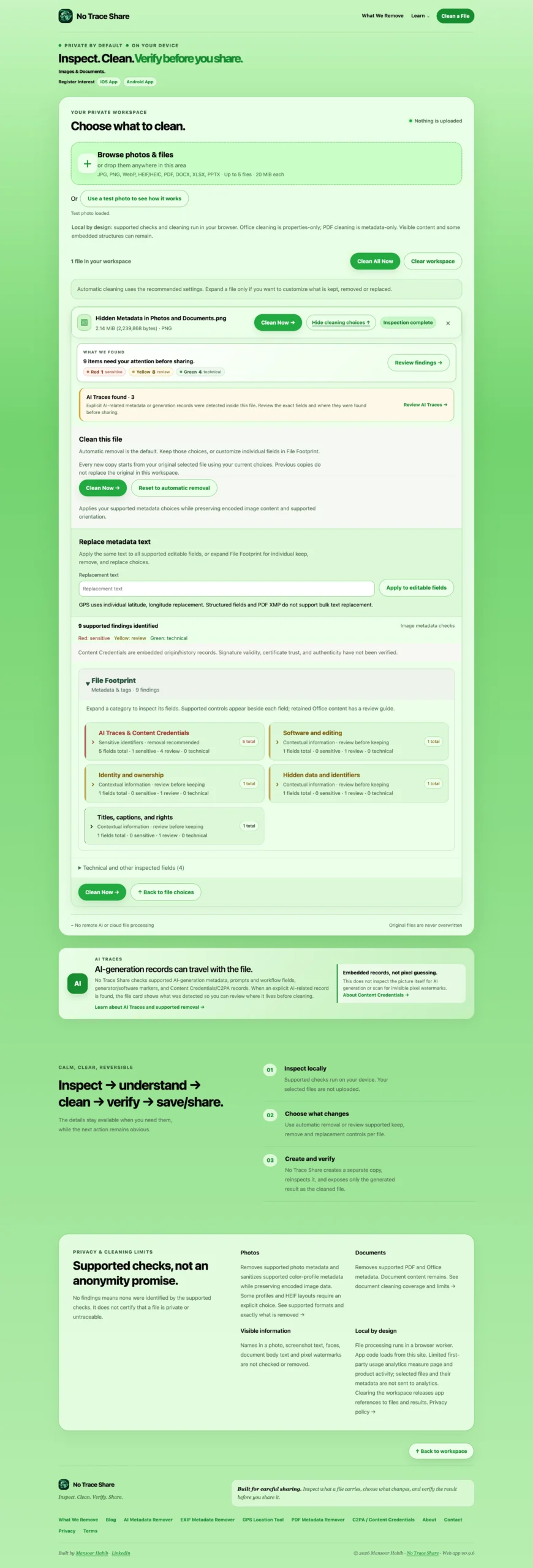
Bonus: The Featured Image of this post was generated with ChatGPT and cleaned with No Trace Share.
See what it found, and if you test the same image now, you will find no identifying metadata. Click image to view full size with detailed findings.